Game textures are getting huge. They take up too much space on your disk. Developers need better compression methods. Nvidia RTX NTC is the answer.
This is a new SDK from Nvidia. It stands for Neural Texture Compression. It uses AI to shrink texture files. The quality stays high. The file size gets very small.
We provide the latest tools right here. You can download the NTC Explorer and CLI. These tools let you test this new tech immediately.
What Is Nvidia RTX NTC?
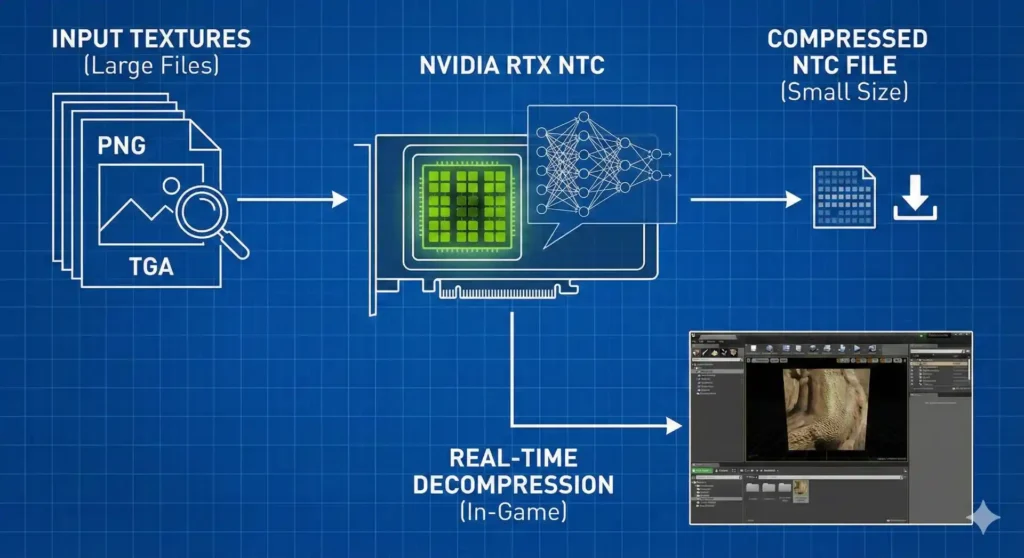
Nvidia RTX NTC is a compression technology. It is built for modern games. It does not use standard block compression like BC7. It uses neural networks.
A small neural network decodes the texture. This happens in real-time. It works on your graphics card.
This approach compresses material data together. It groups albedo, normal, and roughness maps. This saves more space than compressing them separately.
Why Use This Technology?
Standard formats are old. Formats like JPEG or DDS have limits. Neural compression breaks those limits.
It creates files that are 4x smaller than BC7. The visual quality is almost the same.
Key Benefits:
- Storage: Save massive amounts of disk space.
- VRAM: Use less video memory during gameplay.
- Quality: Textures look sharp and detailed.
- Random Access: The GPU can read any part of the texture instantly.
What Is Inside This Download?
This package is for developers and enthusiasts. It contains the tools you need to experiment.
1. NTC Explorer
This is a visual tool. You can open NTC files. You can compare them to original images. It is great for checking quality.
2. NTC CLI (Command Line)
This is for power users. It lets you compress textures via text commands. You can process many files at once.
3. Sample Materials
The download includes example files. You can test the viewer immediately. You do not need your own textures to start.
System Requirements
This tech is demanding. You need a modern GPU. It uses specific hardware features.
- OS: Windows 10 or Windows 11 (64-bit).
- Recommended GPU: Nvidia RTX 4000 series (Ada Architecture).
- Minimum GPU: Nvidia RTX 2000 series (Turing).
- Drivers: Latest Nvidia Developer drivers (590.26 or newer).
- DirectX: DX12 with Agility SDK support.
Note: You can run it on older cards. But it will be very slow.
Download Nvidia RTX NTC
Get the complete toolset below. We have packaged the binaries for you.
How to Install and Use
This is not a standard installer. It is a portable tool.
- Download the ZIP file.
- Extract it to a clean folder.
- Navigate to the
binortoolsfolder. - Run
NTC Explorer.exe.
Using the Explorer
- Launch the app.
- Go to File > Open.
- Select an
.ntcfile from the assets. - Use the mouse to zoom and pan.
- Toggle “Compare Mode” to see the original.
NTC vs. Standard Compression (BC7)
Is it really better? Let’s look at the numbers.
| Feature | Standard BC7 | Nvidia RTX NTC |
| File Size | Large (10MB) | Small (1.5MB) |
| Quality | High | High (40-50 dB) |
| Memory Cost | High | Low |
| Hardware | Any GPU | RTX Recommended |
Common Issues
This is Beta software. You might face bugs.
App crashes on start
Your GPU might be too old. You need a card that supports Shader Model 6. Also, if you are using Nvidia Profile Inspector, ensure you haven’t forced any incompatible driver flags.”
Textures look blurry
Check the compression settings. Higher compression saves space but lowers detail.
“Missing DLL” Error
Install the latest Visual C++ Redistributable. Also update your Vulkan runtime.
Frequently Asked Questions
Is this for gamers or developers?
It is mostly for developers. Gamers can use it to view demo files.
Does it work on AMD cards?
Yes. It runs on AMD RX 6000 series. However, it is optimized for Nvidia RTX hardware.
Can I use this in my game engine?
Yes. But you need to integrate the SDK code. It is not a simple plugin yet.
Is it safe to download?
Yes. Our files are scanned. They come directly from the open-source release.
Conclusion
Nvidia RTX NTC is the future. It changes how games handle graphics. Textures get smaller without losing detail.
If you are a tech enthusiast, you should try it. Download the tools today. See the power of neural compression yourself.
Leave a Reply